Finding the Right Dragon Fury Login: A Guide to Dragonfury.us
Dragon Fury Team · September 14, 2026
Looking for your Dragon Fury account? Learn how to check the website address, choose the right login, and avoid sharing credentials with the wrong site.
For a DragonFury.us account, the website login is dragonfury.us/sign-in. The address matters more than a familiar logo. A Dragon Fury game login at another destination is a different screen and may require different login details.
The website login on a phone
- Open the website sign-in page and confirm the dragonfury.us address.
- Find Email or username and Password. Use the login details for your website account, rather than a connected game account.
- If you need recovery instead, choose Forgot password? beside the password field.
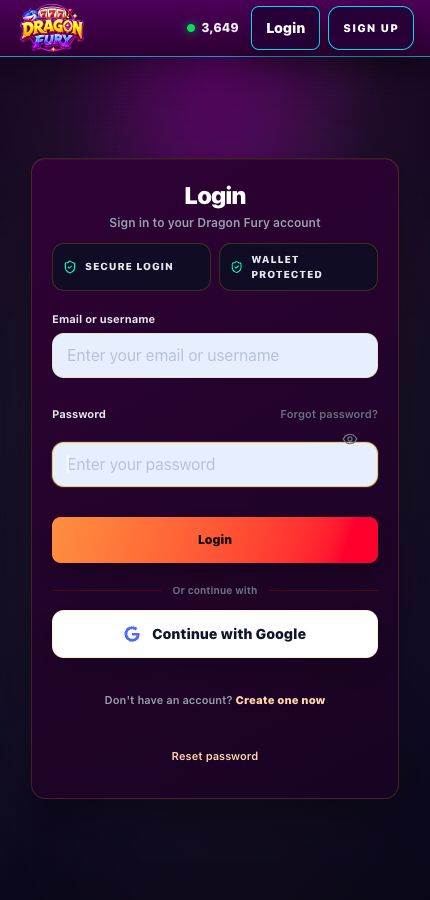
Original website login screen with both fields empty. Captured October 10, 2026; no account login details are shown. Select the image to view it at full size.
Bookmark the login you actually use
Open the homepage, check the address bar and select Login. Once you have confirmed the destination, save that address. A search result or advertisement with a matching name does not establish that it holds your account.
Use the sign-in method associated with your registration. Check that your password manager selected the correct website and account; a saved entry for another domain will not become compatible because the logos look similar.
Website sign-in succeeded, but the game asks again
That second prompt can belong to the selected game platform. Return to its account card and follow the login details shown there. The Dragon Fury game guide explains the distinction for dragonfury.club.
If the dashboard opens normally, resetting the website password is not the first response to a game-launch problem. Use launch troubleshooting to identify the failed stage.
On a shared phone or computer
Check whose browser profile is active before using saved login details. Sign out when finished. If an unfamiliar account opens, leave that session and choose your own account rather than changing its details.
For a rejected password or a login form that keeps loading, continue with the sign-in troubleshooting guide. It covers errors after you have identified the correct destination.