Dragon Fury Sign-In Troubleshooting: What to Check Before Trying Again
Dragon Fury Team · September 14, 2026
Troubleshoot Dragon Fury sign-in problems with a practical checklist covering the website address, saved credentials, loading issues, and useful support details.
The next step depends on where sign-in stops: before the form loads, when it rejects your login details, or after submission. Make that distinction before trying another password or creating another account.
Open the recovery screen without guessing another password
From Sign In, choose Forgot password?. The next screen asks for an email and shows Reset password, with a Contact support option below. Check that you are recovering this website account before entering your email.
The walkthrough confirms where the form opens; it does not submit a reset or verify an email-delivery result.
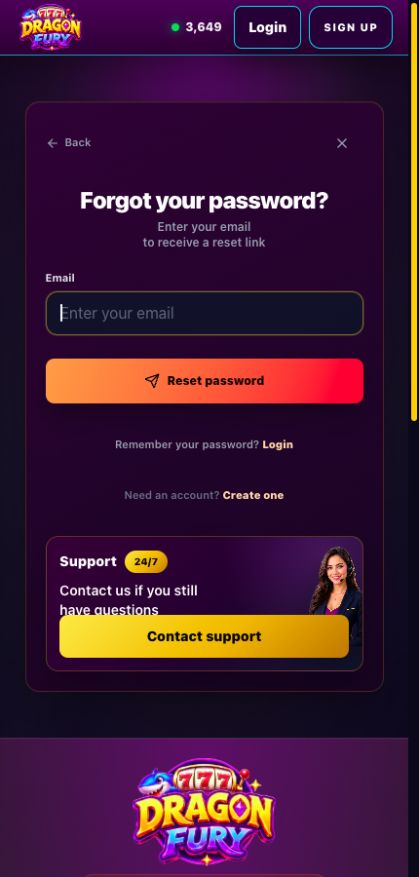
Original recovery screen, captured October 10, 2026. The form was viewed without submitting a reset. Select the image to view it at full size.
Match the symptom to a check
| Symptom | First check |
|---|---|
| The login page will not load | Confirm the website address and connection. Record any page error. |
| Password rejected | Confirm the account selected by your password manager and the sign-in method used at registration. |
| Submission keeps loading | Record the time and message, then compare one current browser or private window. |
| Dashboard works; game fails | Follow game-launch help. Website access has already succeeded. |
Start at the confirmed website login. If you originally used a third-party sign-in option, use that method when it is offered; do not assume it also created a separate password.
What a browser comparison tells you
A private window starts without your usual session. You may need to sign in again. If the problem happens in one browser but not another, that difference is useful evidence for support. It does not establish that your balance disappeared or that the account needs replacing.
Refresh once rather than repeatedly submitting the form. Keep the exact message, including whether it appeared before or after submission.
Recovery and escalation
Use the recovery option shown on the confirmed website when a password reset is needed. Keep recovery links and verification codes private. If the expected message does not arrive, check the address you entered and report the missing message.
A useful report says, for example, “The login form loads on Chrome on Android, but submission keeps loading; the same account opens in another browser.” Include the time and timezone. Use the support report template to keep the details together.