Dragon Fury Games: Categories, Search and Game Access
Dragon Fury Team · September 23, 2026
Find individual games in Dragon Fury using search, provider filters, sorting, and favorites, then check the selected game's preview and current access status.
Remember a game name but not where to find it? Search the blog for a distinctive phrase first. The search includes the complete provider directories, so the result can identify the provider before you open its game catalogue.
A title search that identifies Habanero
- Open the blog library and enter Genie's Showtime in Search articles.
- Find the Habanero provider guide in the results. The example screenshot records that result at capture time; other relevant guides may also appear as the library grows.
- Open Habanero, use its Search game titles field and compare the exact title in that directory.
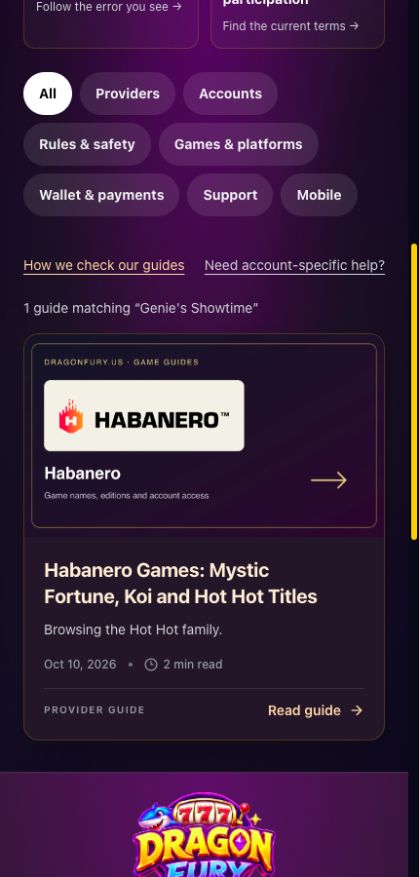
Original across providers article search, captured October 10, 2026. Search results identify guides; they do not launch games. Select the image to view it at full size.
A search that starts broad and ends precise
Try Sweet Bonanza to find the family, then compare 2500, Super Scatter or the other full edition names. For Habanero, Hot Hot finds several related names; Fruit, Halloween and Summer distinguish them.
Short words such as Gold, Wild or Reels can return many unrelated choices. A distinctive two-word phrase is usually a more useful starting point. Keep the provider with the title once you find it.
Provider titles and connected platforms are different areas
Pragmatic, Habanero and other provider cards list individual titles. Juwa, GameVault and Dragon Fury are connected platform destinations with their own account instructions. The provider directory covers the first group; the guide map covers both.
A title containing Fish does not establish a fishing category. Likewise, Poker in a menu may identify a lobby rather than a verified list of table variants. Read the selected entry and its own instructions.
Once you reach the catalogue
Clear an old search if nothing appears. Confirm the selected provider before changing the wording. Sort controls change the order of results; they do not change your account readiness or balance.
Open the intended card and read its preview before launch. If the card is missing, record the search and provider you used. If it is present but will not open, use launch troubleshooting. A missing search result and a failed launch need different checks.